FEFreeExamDumps.in

SC-200 Practice Questions — Page 25

Question 241

Open question ↗

You have 500 on-premises Windows 11 devices that use Microsoft Defender for Endpoint.

You enable Network device discovery.

You need to create a hunting query that will identify discovered network devices and return the identity of the onboarded device that discovered each network device.

Which built-in function should you use?

  • A.SeenBy()
  • B.DeviceFromIP()
  • C.next()
  • D.current_cluster_endpoint()

Question 242

Open question ↗

You have a Microsoft 365 subscription that contains a user named User1 and two Windows devices named Device1 and Device2. Device1 and Device2 are onboarded to Microsoft Defender for Endpoint.

The following events occur.

• User1 signs in to Device1.

• Automatic attack disruption in Microsoft Defender XDR responds to an attack on Device1 and contains User1.

• User1 attempts to connect to Device2.

Which protocols will Device2 block when User1 attempts to connect to Device2?

  • A.RDP only
  • B.RPC only
  • C.SMB only
  • D.RDP and RPC only
  • E.SMB and RPC only
  • F.RDP, RPC, and SMB

Question 243

Open question ↗

You have an Azure subscription that contains a Microsoft Sentinel workspace named WS1. WS1 has the Azure Activity connector and the Microsoft Entra ID connector configured.

You need to investigate which accounts have the most alerts and any corresponding incident information for each alert. The solution must minimize administrative effort.

What should you do first in WS1?

  • A.Use User and Entity Behavior Analytics (UEBA) to detect anomalies.
  • B.Enable User and Entity Behavior Analytics (UEBA).
  • C.From Content hub, install the Microsoft Purview insider risk management solution.
  • D.From Content hub, install Cloud Identity Threat Protection Essentials.

Question 244

Open question ↗

You have a Microsoft 365 E5 subscription that uses Microsoft Defender XDR.

You are investigating an incident.

You need to review the incident tasks that were performed.

What can you use on the Incident page?

  • A.Tasks only
  • B.Tasks and Activity log only
  • C.Tasks and Alert timeline only
  • D.Tasks, Activity log, and Alert timeline

Question 245

Open question ↗

You have an Azure subscription.

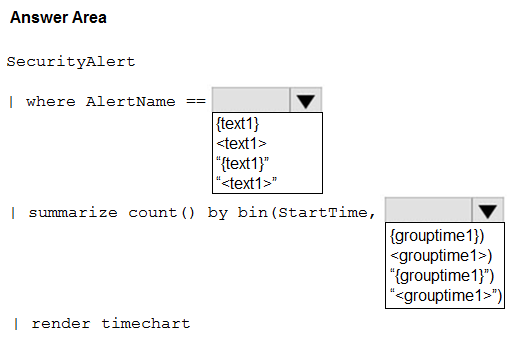
You have a Microsoft Sentinel workbook that contains the following text parameters:

• text1

• grouptime1

You need to display the count of security alerts. The count must be filtered based on the text1 parameter and grouped by the grouptime1 parameter.

How should you complete the KOL query? To answer, select the appropriate options in the answer area.

NOTE: Each correct selection is worth one point.

Question 245

Question 246

Open question ↗

You have a Microsoft 365 subscription that contains a Windows device named Device1. Device1 is onboarded to Microsoft Defender for Endpoint.

You initiate a live response session on Device1.

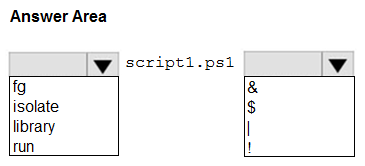
You need to execute a long running script. The solution must ensure that you can run additional commands during the session while the script is running.

How should you complete the live response command? To answer, select the appropriate options in the answer area.

NOTE: Each correct selection is worth one point.

Question 246

Question 247

Open question ↗

You have a Microsoft 365 E5 subscription that uses Microsoft Exchange Online.

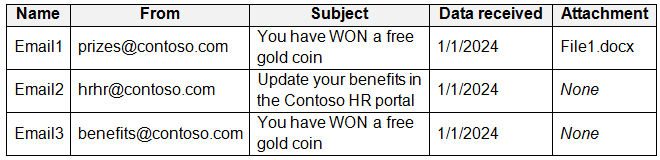
You identify the suspicious emails shown in the following table.

In Microsoft Purview, you create the content searches shown in the following table.

For each of the following statements, select Yes if the statement is true. Otherwise, select No.

NOTE: Each correct selection is worth one point.

Question 247

Question 248

Open question ↗

You have a Microsoft 365 E5 subscription that uses Microsoft Copilot for Security.

You have a Copilot for Security workspace that uses the following plugins:

• Microsoft Entra

• Microsoft Defender XDR

From the Microsoft Defender portal, you use Copilot for Security to investigate a reported incident.

You need to run a promptbook that will include information from Microsoft Entra ID Protection in the investigation.

What should you do first?

  • A.From the Microsoft Defender portal, create an incident report.
  • B.Open the investigation in the Copilot for Security standalone experience. ✓
  • C.Open the investigation in Microsoft Sentinel.
  • D.From the Microsoft Defender portal, create an advanced hunting query.

Question 249

Open question ↗

You have 1,000 on-premises Windows 11 Pro devices that are onboarded to Microsoft Defender for Endpoint.

You have a Microsoft 365 subscription that uses Microsoft Defender XDR.

You identify that an attacker performed the following actions on a device:

• Modified the filesystem path of a registry-based antivirus exclusion

• Downloaded a malicious file to the file system path

You initiate a live response session on the device.

You need to undo the registry change.

Which command should you run?

  • A.remediate
  • B.registry
  • C.scan
  • D.analyze

Question 250

Open question ↗

Your on-premises network contains two Active Directory Domain Services (AD DS) domains named contoso.com and fabrikam.com. Contoso.com contains a group named Group1. Fabrikam.com contains a group named Group2.

You have a Microsoft Sentinel workspace named WS1 that contains a scheduled query rule named Rule1. Rule1 generates alerts in response to anomalous AD DS security events. Each alert creates an incident.

You need to implement an incident triage solution that meets the following requirements:

• Security incidents from contoso.com must be assigned to Group1.

• Security incidents from fabrikam.com must be assigned to Group2.

• Administrative effort must be minimized.

What should you include in the solution?

  • A.a playbook that is triggered by the creation of an incident
  • B.a playbook that is triggered by the creation of an alert
  • C.one automation rule assigned to Rule1
  • D.two automation rules assigned to Rule1