FEFreeExamDumps.in

SC-300 Practice Questions — Page 12

Question 111

Open question ↗

You have a Microsoft 365 E5 subscription and an Azure subscription.

You need to meet the following requirements:

• Ensure that users can sign in to Azure virtual machines by using their Microsoft 365 credentials.

• Delegate the ability to create new virtual machines.

What should you use for each requirement? To answer, drag the appropriate features to the correct requirements. Each feature may be used once, more than once, or not at all. You may need to drag the split bar between panes or scroll to view content.

NOTE: Each correct selection is worth one point.

Question 111

Question 112

Open question ↗

You have a Microsoft 365 tenant.

All users have mobile phones and Windows 10 laptops.

The users frequently work from remote locations that do not have Wi-Fi access or mobile phone connectivity. While working from the remote locations, the users connect their laptop to a wired network that has internet access.

You plan to implement multi-factor authentication (MFA).

Which MFA authentication method can the users use from the remote location?

  • A.a verification code from the Microsoft Authenticator app ✓
  • B.SMS
  • C.an app password
  • D.a notification through the Microsoft Authenticator app

Question 113

Open question ↗

Your network contains an on-premises Active Directory Domain Services (AD DS) domain that syncs with an Azure AD tenant. The AD DS domain contains the organizational units (OUs) shown in the following table.

You need to create a break-glass account named BreakGlass.

Where should you create BreakGlass, and which role should you assign to BreakGlass? To answer, select the appropriate options in the answer area.

NOTE: Each correct selection is worth one point.

Question 113

Question 114

Open question ↗

You have a Microsoft 365 E5 subscription that contains a Microsoft SharePoint Online site named Site1.

You need to ensure that users can request access to Site1. The solution must meet the following requirements:

• Automatically approve requests from users based on their group membership.

• Automatically remove the access after 30 days.

What should you do?

  • A.Create a Conditional Access policy.
  • B.Create an access package.
  • C.Configure Role settings in Azure AD Privileged Identity Management.
  • D.Create a Microsoft Defender for Cloud Apps access policy.

Question 115

Open question ↗

You have an Azure subscription.

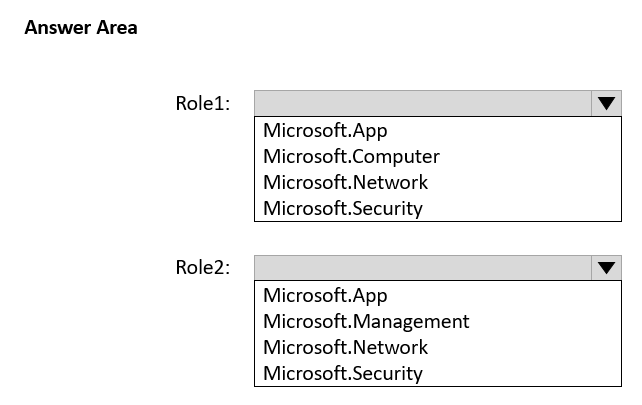
You need to create two custom roles named Role1 and Role2. The solution must meet the following requirements:

• Users that are assigned Role1 can manage application security groups.

• Users that are assigned Role2 can manage Azure Firewall.

Which resource provider permissions are required for each role? To answer, select the appropriate options in the answer area.

NOTE: Each correct selection is worth one point.

Question 115

Question 116

Open question ↗

You have an Azure subscription. The subscription contains 50 virtual machines that run Windows Server.

You enable Microsoft Entra login for the virtual machines.

Users report that they cannot sign in to the virtual machines by using their Microsoft Entra credentials.

You need to ensure that the users can sign in to the virtual machines.

What should you do first?

  • A.From the Microsoft Entra admin center, delete the device registrations of the virtual machines.
  • B.Revoke the primary refresh token.
  • C.Enable SSH client support for OpenSSH.
  • D.Ensure that the virtual machines can access https://enterpriseregistration.windows.net.

Question 117

Open question ↗

You have a Microsoft 365 E5 tenant.

You purchase a cloud app named App1.

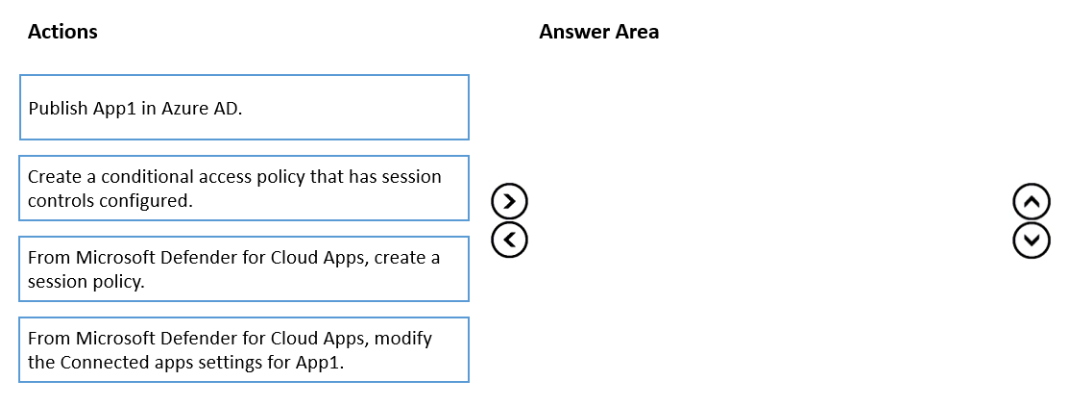
You need to enable real-time session-level monitoring of App1 by using Microsoft Defender for Cloud Apps.

In which order should you perform the actions? To answer, move the appropriate actions from the list of actions to the answer area and arrange them in the correct order.

Question 117

Question 118

Open question ↗

Case Study

Overview

ADatum Corporation is a consulting company in Montreal.

ADatum recently acquired a Vancouver-based company named Litware, Inc.

Existing Environment. ADatum Environment

The on-premises network of ADatum contains an Active Directory Domain Services (AD DS) forest named adatum.com.

ADatum has a Microsoft 365 E5 subscription. The subscription contains a verified domain that syncs with the adatum.com AD DS domain by using Azure AD Connect.

ADatum has an Azure Active Directory (Azure AD) tenant named adatum.com. The tenant has Security defaults disabled.

The tenant contains the users shown in the following table.

The tenant contains the groups shown in the following table.

Existing Environment. Litware Environment

Litware has an AD DS forest named litware.com

Existing Environment. Problem Statements

ADatum identifies the following issues:

• Multiple users in the sales department have up to five devices. The sales department users report that sometimes they must contact the support department to join their devices to the Azure AD tenant because they have reached their device limit.

• A recent security incident reveals that several users leaked their credentials, a suspicious browser was used for a sign-in, and resources were accessed from an anonymous IP address.

• When you attempt to assign the Device Administrators role to IT_Group1, the group does NOT appear in the selection list.

• Anyone in the organization can invite guest users, including other guests and non-administrators.

• The helpdesk spends too much time resetting user passwords.

• Users currently use only passwords for authentication.

Requirements. Planned Changes

ADatum plans to implement the following changes:

• Configure self-service password reset (SSPR).

• Configure multi-factor authentication (MFA) for all users.

• Configure an access review for an access package named Package1.

• Require admin approval for application access to organizational data.

• Sync the AD DS users and groups of litware.com with the Azure AD tenant.

• Ensure that only users that are assigned specific admin roles can invite guest users.

• Increase the maximum number of devices that can be joined or registered to Azure AD to 10.

Requirements. Technical Requirements

ADatum identifies the following technical requirements:

• Users assigned the User administrator role must be able to request permission to use the role when needed for up to one year.

• Users must be prompted to register for MFA and provided with an option to bypass the registration for a grace period.

• Users must provide one authentication method to reset their password by using SSPR. Available methods must include:

- Email

- Phone

- Security questions

- The Microsoft Authenticator app

• Trust relationships must NOT be established between the adatum.com and litware.com AD DS domains.

• The principle of least privilege must be used.

You implement the planned changes for SSPR.

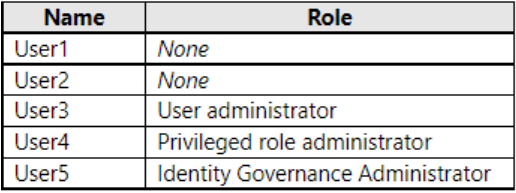
What occurs when User3 attempts to use SSPR? To answer, select the appropriate options in the answer area.

NOTE: Each correct selection is worth one point.

Question 118

Question 119

Open question ↗

Case Study

Overview

ADatum Corporation is a consulting company in Montreal.

ADatum recently acquired a Vancouver-based company named Litware, Inc.

Existing Environment. ADatum Environment

The on-premises network of ADatum contains an Active Directory Domain Services (AD DS) forest named adatum.com.

ADatum has a Microsoft 365 E5 subscription. The subscription contains a verified domain that syncs with the adatum.com AD DS domain by using Azure AD Connect.

ADatum has an Azure Active Directory (Azure AD) tenant named adatum.com. The tenant has Security defaults disabled.

The tenant contains the users shown in the following table.

The tenant contains the groups shown in the following table.

Existing Environment. Litware Environment

Litware has an AD DS forest named litware.com

Existing Environment. Problem Statements

ADatum identifies the following issues:

• Multiple users in the sales department have up to five devices. The sales department users report that sometimes they must contact the support department to join their devices to the Azure AD tenant because they have reached their device limit.

• A recent security incident reveals that several users leaked their credentials, a suspicious browser was used for a sign-in, and resources were accessed from an anonymous IP address.

• When you attempt to assign the Device Administrators role to IT_Group1, the group does NOT appear in the selection list.

• Anyone in the organization can invite guest users, including other guests and non-administrators.

• The helpdesk spends too much time resetting user passwords.

• Users currently use only passwords for authentication.

Requirements. Planned Changes

ADatum plans to implement the following changes:

• Configure self-service password reset (SSPR).

• Configure multi-factor authentication (MFA) for all users.

• Configure an access review for an access package named Package1.

• Require admin approval for application access to organizational data.

• Sync the AD DS users and groups of litware.com with the Azure AD tenant.

• Ensure that only users that are assigned specific admin roles can invite guest users.

• Increase the maximum number of devices that can be joined or registered to Azure AD to 10.

Requirements. Technical Requirements

ADatum identifies the following technical requirements:

• Users assigned the User administrator role must be able to request permission to use the role when needed for up to one year.

• Users must be prompted to register for MFA and provided with an option to bypass the registration for a grace period.

• Users must provide one authentication method to reset their password by using SSPR. Available methods must include:

- Email

- Phone

- Security questions

- The Microsoft Authenticator app

• Trust relationships must NOT be established between the adatum.com and litware.com AD DS domains.

• The principle of least privilege must be used.

You need to resolve the recent security incident issues.

What should you configure for each incident? To answer, drag the appropriate policy types to the correct issues. Each policy type may be used once, more than once, or not at all. You may need to drag the split bar between panes or scroll to view content.

NOTE: Each correct selection is worth one point.

Question 119

Question 120

Open question ↗

You have a Microsoft 365 E5 subscription that uses Microsoft Defender for Cloud Apps and Yammer.

You need prevent users from signing in to Yammer from high-risk locations.

What should you do in the Microsoft Defender for Cloud Apps portal?

  • A.Create an access policy.
  • B.Create an activity policy.
  • C.Unsanction Yammer.
  • D.Create an anomaly detection policy.