FEFreeExamDumps.in

SC-300 Practice Questions — Page 18

Question 171

Open question ↗

You have an Azure subscription that contains two resource groups named RG1 and RG2, a storage account named storage1.

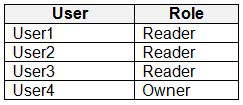
You assign roles for the subscription as shown in the following table.

You assign roles for RG1 as shown in the following table.

You assign roles for storage1 as shown in the following exhibit.

Roles are NOT assigned for other Azure resources.

For each of the following statements, select Yes if the statement is true. Otherwise, select No.

NOTE: Each correct selection is worth one point.
Question 171

Question 172

Open question ↗

You have a Microsoft Entra tenant that contains 1,000 users. The users are assigned Microsoft Entra Suite licenses.

You are deploying Global Secure Access.

You need to ensure that connections to www.microsoft.com are bypassed by Global Secure Access.

Which profiles should you update?

  • A.Intemet access profile only
  • B.Microsoft traffic profile only
  • C.Microsoft traffic profile and Internet access profile only
  • D.Microsoft traffic profile, Private access profile, and Internet access profile

Question 173

Open question ↗

You have a Microsoft 365 subscription.

You need to ensure that users can grant enterprise applications access to their profile. The solution must ensure that the users can consent only to the User.Read and profile delegated permissions.

What should you configure first?

  • A.Identity Protection settings
  • B.Permission classifications
  • C.Admin consent settings
  • D.Security defaults

Question 174

Open question ↗

You have a Microsoft Entra tenant that contains 1,000 users. The users are assigned Microsoft Entra Suite licenses.

You perform the following actions:

• Deploy Global Secure Access.

• Create a Global Secure Access security profile named Profile1.

• Create the following Conditional Access policies:

o Name: CApolicy1

o Target resources: All internet resources with Global Secure Access

o Name: CApolicy2

o Session:

- Use Global Secure Access security profile: Profile1

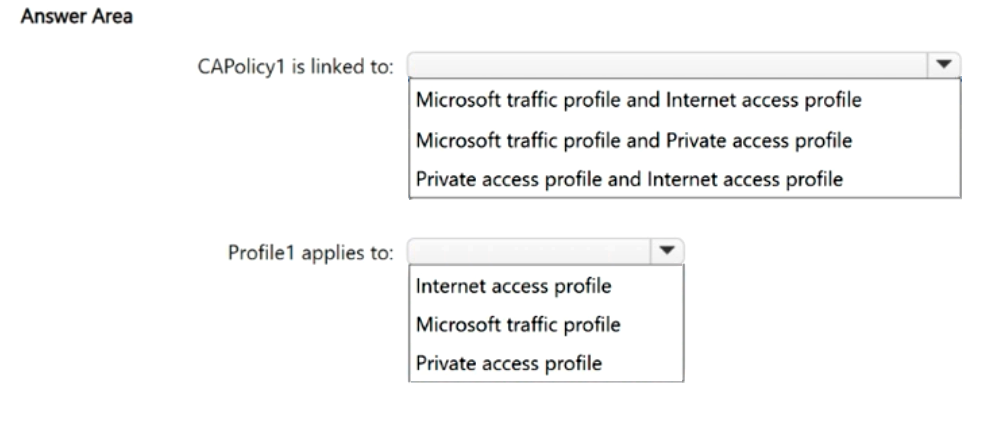
To which Global Secure Access traffic forwarding profiles is CAPolicy1 linked, and to which profile does Profile1 apply? To answer, select the appropriate options in the answer area.

NOTE: Each correct selection is worth one point.

Question 174

Question 175

Open question ↗

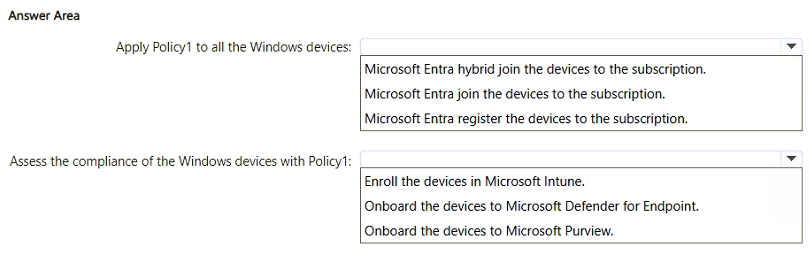
Your network contains an on-premises Active Directory Domain Services (AD DS) domain. The domain contains 500 Windows 11 devices.

You have a Microsoft 365 subscription that syncs with the domain.

You create a Conditional Access policy named Policy1.

You need to meet the following requirements:

• Apply Policy1 to all the Windows devices.

• Assess the compliance of the Windows devices with Policy1.

What should you do for each requirement? To answer, select the appropriate options in the answer area.

NOTE: Each correct selection is worth one point.

Question 175

Question 176

Open question ↗

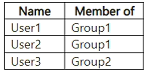
You have a Microsoft Entra tenant that contains two remote networks named RemoteNetwork1 and RemoteNetwork2 and the users shown in the following table.

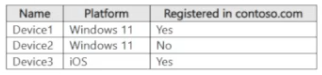
You have the devices shown in the following table.

You have a Conditional Access policy that has the following settings:

o Name: CAPolicy1

o Assignments

- Users: Group1, Group2

- Target resources: All internet resources with Global Secure Access

o Access controls

- Grant: Require multifactor authentication

o Enable policy: On

Global Secure Access traffic forwarding is configured as shown in the following exhibit.

For each of the following statements, select Yes if the statement is true. Otherwise, select No.

NOTE: Each correct selection is worth one point.
Question 176

Question 177

Open question ↗

You have a Microsoft Entra tenant named contoso.com that contains a user named User1.

User1 has the devices shown in the following table:

On November 5, 2025, you create and enforce terms of use in contoso.com that has the following settings:

• Name: Terms1

• Display name: Contoso terms of use

• Require users to expand the terms of use: On

• Require users to consent on every device: On

• Expire consents: On

• Expire starting on: December 10, 2025

• Frequency: Monthly

On November 15, 2025, User1 accepts Terms1 on Device3.

For each of the following statements, select Yes if the statement is true. Otherwise, select No.

NOTE: Each correct selection is worth one point.
Question 177

Question 178

Open question ↗

You have a Microsoft Entra tenant.

You have 500 devices that run either Windows 11, macOS, iOS, or Android and are enrolled in Microsoft Intune.

You plan to deploy the Global Secure Access client.

From the Microsoft Entra admin center, you download the Global Secure Access client for each operating system.

You need to deploy the client to the macOS devices by using Intune.

Which file extension should you use when uploading the client to Intune?

  • A..ipa
  • B..apk
  • C..intunewin
  • D..pkg

Question 179

Open question ↗

You have a Microsoft 365 tenant.

All users have mobile phones and Windows 11 laptops.

The users frequently work from remote locations that do not have Wi-Fi access or mobile phone connectivity. While working from the remote locations, the users connect their laptop to a wired network that has internet access.

You plan to implement multi-factor authentication (MFA).

Which MFA authentication method can the users use from the remote location?

  • A.email
  • B.voice
  • C.an app password

Question 180

Open question ↗

You have an Azure subscription that contains an Azure Automation account named Automation1 and an Azure key vault named Vault1. Vault1 contains a secret named Secret1.

You enable a system-assigned managed identity for Automation1.

You need to ensure that Automation1 can read the contents of Secret1. The solution must meet the following requirements:

• Prevent Automation1 from accessing other secrets stored in Vault1.

• Follow the principle of least privilege.

What should you do?

  • A.From Vault1, configure the Access control (IAM) settings.
  • B.From Automation1, configure the Identity settings.
  • C.From Automation1, configure the Run as accounts settings.
  • D.From Secret1, configure the Access control (IAM) settings.