FEFreeExamDumps.in

SC-300 Practice Questions — Page 20

Question 191

Open question ↗

You have a Microsoft 365 E5 subscription that uses Microsoft Defender for Cloud Apps and Conditional Access policies.

You need to block access to cloud apps when a user is assessed as high risk.

Which type of policy should you create in the Microsoft Defender for Cloud Apps portal?

  • A.access policy
  • B.OAuth app policy
  • C.anomaly detection policy
  • D.activity policy

Question 192

Open question ↗

You have a Microsoft 365 tenant.

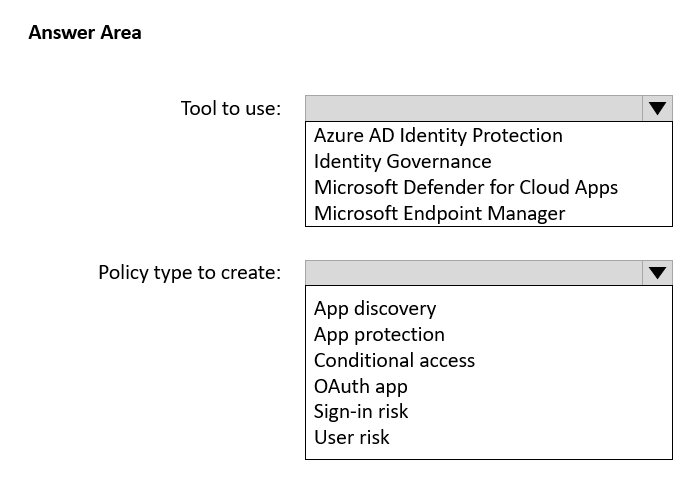
Sometimes, users use external, third-party applications that require limited access to the Microsoft 365 data of the respective user. The users register the applications in Azure AD.

You need to receive an alert if a registered application gains read and write access to the users’ email.

What should you do? To answer, select the appropriate options in the answer area.

NOTE: Each correct selection is worth one point.

Question 192

Question 193

Open question ↗

Case Study

Overview

ADatum Corporation is a consulting company in Montreal.

ADatum recently acquired a Vancouver-based company named Litware, Inc.

Existing Environment. ADatum Environment

The on-premises network of ADatum contains an Active Directory Domain Services (AD DS) forest named adatum.com.

ADatum has a Microsoft 365 E5 subscription. The subscription contains a verified domain that syncs with the adatum.com AD DS domain by using Azure AD Connect.

ADatum has an Azure Active Directory (Azure AD) tenant named adatum.com. The tenant has Security defaults disabled.

The tenant contains the users shown in the following table.

The tenant contains the groups shown in the following table.

Existing Environment. Litware Environment

Litware has an AD DS forest named litware.com

Existing Environment. Problem Statements

ADatum identifies the following issues:

• Multiple users in the sales department have up to five devices. The sales department users report that sometimes they must contact the support department to join their devices to the Azure AD tenant because they have reached their device limit.

• A recent security incident reveals that several users leaked their credentials, a suspicious browser was used for a sign-in, and resources were accessed from an anonymous IP address.

• When you attempt to assign the Device Administrators role to IT_Group1, the group does NOT appear in the selection list.

• Anyone in the organization can invite guest users, including other guests and non-administrators.

• The helpdesk spends too much time resetting user passwords.

• Users currently use only passwords for authentication.

Requirements. Planned Changes

ADatum plans to implement the following changes:

• Configure self-service password reset (SSPR).

• Configure multi-factor authentication (MFA) for all users.

• Configure an access review for an access package named Package1.

• Require admin approval for application access to organizational data.

• Sync the AD DS users and groups of litware.com with the Azure AD tenant.

• Ensure that only users that are assigned specific admin roles can invite guest users.

• Increase the maximum number of devices that can be joined or registered to Azure AD to 10.

Requirements. Technical Requirements

ADatum identifies the following technical requirements:

• Users assigned the User administrator role must be able to request permission to use the role when needed for up to one year.

• Users must be prompted to register for MFA and provided with an option to bypass the registration for a grace period.

• Users must provide one authentication method to reset their password by using SSPR. Available methods must include:

- Email

- Phone

- Security questions

- The Microsoft Authenticator app

• Trust relationships must NOT be established between the adatum.com and litware.com AD DS domains.

• The principle of least privilege must be used.

You need implement the planned changes for application access to organizational data.

What should you configure?

Question 193
  • A.authentication methods
  • B.the User consent settings
  • C.access packages
  • D.an application proxy

Question 194

Open question ↗

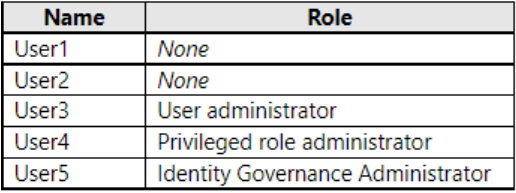
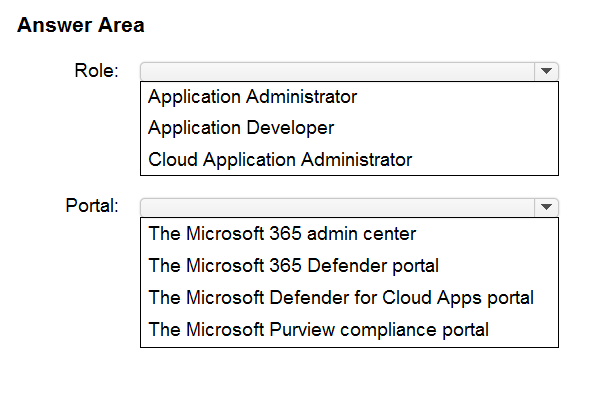
You have a Microsoft 365 E5 subscription that contains a user named User1.

You configure app governance integration.

User1 needs to view the App governance dashboard. The solution must use the principle of the least privilege.

Which role should you assign to User1, and which portal should User1 use to view the dashboard? To answer, select the appropriate options in the answer area.

NOTE: Each correct selection is worth one point.

Question 194

Question 195

Open question ↗

You have an Azure subscription.

You are evaluating enterprise software as a service (SaaS) apps.

You need to ensure that the apps support automatic provisioning of Azure AD users.

Which specification should the apps support?

  • A.OAuth 2.0
  • B.WS-Fed
  • C.SCIM 2.0
  • D.LDAP 3

Question 196

Open question ↗

You have an Azure AD tenant and a .NET web app named App1.

You need to register App1 for Azure AD authentication.

What should you configure for App1?

  • A.the executable name
  • B.the bundle ID
  • C.the package name
  • D.the redirect URI

Question 197

Open question ↗

You have a Microsoft 365 subscription.

You plan to deploy an app named App1 that will have the following configurations:

• Will be registered in Microsoft Entra

• Will run as a service without user interaction

• Will collect audit logs associated with user sign-ins

• Will access resources by using the Microsoft Graph API

You need to ensure that App1 can access Microsoft Graph.

What should you use?

  • A.a built-in role-based access control (RBAC) role
  • B.a custom role-based access control (RBAC) role
  • C.application permissions
  • D.delegated permissions

Question 198

Open question ↗

Your company purchases a new Microsoft 365 E5 subscription and an app named App1.

You need to create a Microsoft Defender for Cloud Apps access policy for App1.

What should you do you first?

  • A.Configure a Conditional Access policy to use app-enforced restrictions.
  • B.Configure a Token configuration for App1.
  • C.Add an API permission for App1.
  • D.Configure a Conditional Access policy to use Conditional Access App Control.

Question 199

Open question ↗

Case Study

Overview

Contoso, Ltd. is a consulting company that has a main office in Montreal and branch offices in London and Seattle.

Contoso has a partnership with a company named Fabrikam, Inc. Fabrikam has an Azure AD tenant named fabrikam.com.

Existing Environment. Existing Environment

The on-premises network of Contoso contains an Active Directory domain named contoso.com. The domain contains an organizational unit (OU) named Contoso_Resources. The Contoso_Resources OU contains all users and computers.

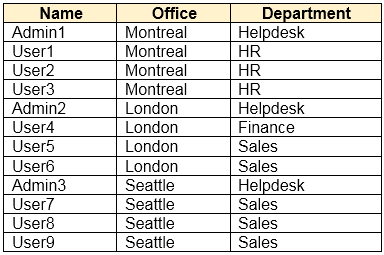
The contoso.com Active Directory domain contains the relevant users shown in the following table.

Contoso also includes a marketing department that has users in each office.

Existing Environment. Microsoft 365/Azure Environment

Contoso has an Azure AD tenant named contoso.com that has the following associated licenses:

• Microsoft Office 365 Enterprise E5

• Enterprise Mobility + Security E5

• Windows 10 Enterprise E3

• Project Plan 3

Azure AD Connect is configured between Azure AD and Active Directory Domain Services (AD DS). Only the Contoso_Resources OU is synced.

Helpdesk administrators routinely use the Microsoft 365 admin center to manage user settings.

User administrators currently use the Microsoft 365 admin center to manually assign licenses. All users have all licenses assigned besides the following exceptions:

• The users in the London office have the Microsoft 365 Phone System license unassigned.

• The users in the Seattle office have the Yammer Enterprise license unassigned.

Security defaults are disabled for contoso.com.

Contoso uses Azure AD Privileged Identity Management (PIM) to protect administrative roles.

Existing Environment. Problem Statements

Contoso identifies the following issues:

• Currently, all the helpdesk administrators can manage user licenses throughout the entire Microsoft 365 tenant.

• The user administrators report that it is tedious to manually configure the different license requirements for each Contoso office.

• The helpdesk administrators spend too much time provisioning internal and guest access to the required Microsoft 365 services and apps.

• Currently, the helpdesk administrators can perform tasks by using the User administrator role without justification or approval.

• When the Logs node is selected in Azure AD, an error message appears stating that Log Analytics integration is not enabled.

Requirements. Planned Changes

Contoso plans to implement the following changes:

• Implement self-service password reset (SSPR).

• Analyze Azure audit activity logs by using Azure Monitor.

• Simplify license allocation for new users added to the tenant.

• Collaborate with the users at Fabrikam on a joint marketing campaign.

• Configure the User administrator role to require justification and approval to activate.

• Implement a custom line-of-business Azure web app named App1. App1 will be accessible from the internet and authenticated by using Azure AD accounts.

• For new users in the marketing department, implement an automated approval workflow to provide access to a Microsoft SharePoint Online site, group, and app.

Contoso plans to acquire a company named A. Datum Corporation. One hundred new A. Datum users will be created in an Active Directory OU named Adatum. The users will be located in London and Seattle.

Requirements. Technical Requirements

Contoso identifies the following technical requirements:

• All users must be synced from AD DS to the contoso.com Azure AD tenant.

• App1 must have a redirect URI pointed to https://contoso.com/auth-response.

• License allocation for new users must be assigned automatically based on the location of the user.

• Fabrikam users must have access to the marketing department’s SharePoint site for a maximum of 90 days.

• Administrative actions performed in Azure AD must be audited. Audit logs must be retained for one year.

• The helpdesk administrators must be able to manage licenses for only the users in their respective office.

• Users must be forced to change their password if there is a probability that the users’ identity was compromised.

You need to meet the planned changes and technical requirements for App1.

What should you implement?
Question 199
  • A.a policy set in Microsoft Intune
  • B.Azure AD Application Proxy
  • C.an app configuration policy in Microsoft Intune
  • D.an app registration in Azure AD

Question 200

Open question ↗

Note: This question is part of a series of questions that present the same scenario. Each question in the series contains a unique solution that might meet the stated goals. Some question sets might have more than one correct solution, while others might not have a correct solution.

After you answer a question in this section, you will NOT be able to return to it. As a result, these questions will not appear in the review screen.

You have an Amazon Web Services (AWS) account, a Google Workspace subscription, and a GitHub account.

You deploy an Azure subscription and enable Microsoft 365 Defender.

You need to ensure that you can monitor OAuth authentication requests by using Microsoft Defender for Cloud Apps.

Solution: From the Microsoft 365 Defender portal, you add the Google Workspace app connector.

Does this meet the goal?

  • A.Yes
  • B.No