FEFreeExamDumps.in

SC-300 Practice Questions — Page 9

You have a Microsoft Entra tenant.

You create an enterprise application collection named HR Apps that has the following settings:

• Applications: App1, App2, App3

• Owners: Admin1

• Users and groups: HRUsers

All three apps have the following Properties settings:

• Enabled for users to sign in: Yes

• User assignment required: Yes

• Visible to users: Yes

Users report that they only see App1 and App2 in the My Apps portal.

You need to ensure that the users can also see App3.

What should you do from App3?

  • A.From Single sign-on, configure a sign-on method.
  • B.From Permissions, review the User consent permissions.
  • C.From Users and groups, add HRUsers. ✓
  • D.From Properties, change User assignment required to No.
You have 2,500 users who are assigned Microsoft 365 E3 licenses. The licenses are assigned to individual users.

You assign Microsoft 365 E5 licenses to a group that includes all users.

You need to remove the Microsoft 365 E3 licenses from the users by using the least amount of administrative effort.

What should you use?

  • A.the Update-MgGroup cmdlet
  • B.the Set-WindowsProductKey cmdlet
  • C.the Set-MgUserLicense cmdlet
  • D.the Licenses blade in the Microsoft Entra admin center

You have a Microsoft Entra tenant named contoso.com that contains an enterprise application named App1.

A contractor uses the credentials of [email protected].

You need to ensure that you can provide the contractor with access to App1. The contractor must be able to authenticate as [email protected].

What should you do?

  • A.Configure the External collaboration settings.
  • B.Run the New-MgUser cmdlet.
  • C.Create a guest user account in contoso.com ✓
  • D.Add a custom domain name to contoso.com.

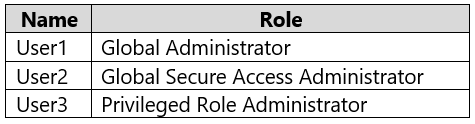
You have a Microsoft 365 E5 subscription that contains the users shown in the following table.

You configure Microsoft Entra Internet Access.

Which users can manage Microsoft Entra Internet Access?

Question 84
  • A.User1 only
  • B.User2 only
  • C.User3 only
  • D.User1 and User2 only
  • E.User1, User2, and User3

You have an Azure Active Directory (Azure AD) tenant named contoso.com.

All users who run applications registered in Azure AD are subject to conditional access policies.

You need to prevent the users from using legacy authentication.

What should you include in the conditional access policies to filter out legacy authentication attempts?

  • A.a cloud apps or actions condition
  • B.a user risk condition
  • C.a client apps condition
  • D.a sign-in risk condition

You have a Microsoft 365 tenant.

All users have computers that run Windows 10. Most computers are company-owned and joined to Azure Active Directory (Azure AD). Some computers are user- owned and are only registered in Azure AD.

You need to prevent users who connect to Microsoft SharePoint Online on their user-owned computer from downloading or syncing files. Other users must NOT be restricted.

Which policy type should you create?

  • A.a Microsoft Cloud App Security activity policy that has Microsoft Office 365 governance actions configured
  • B.an Azure AD conditional access policy that has session controls configured
  • C.an Azure AD conditional access policy that has client apps conditions configured
  • D.a Microsoft Cloud App Security app discovery policy that has governance actions configured

You have a Microsoft Entra tenant.

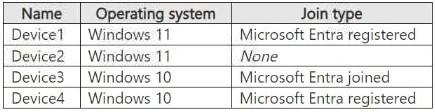
You have the devices shown in the following table.

You configure Microsoft Entra Internet Access for the tenant.

On which devices can you use Global Secure Access?

Question 87
  • A.Device1 only
  • B.Device3 only
  • C.Device1 and Device2 only
  • D.Device1, Device3, and Device4 only
  • E.Device1, Device2, Device3, and Device4

You have a Microsoft 365 tenant.

All users have mobile phones and laptops.

The users frequently work from remote locations that do not have Wi-Fi access or mobile phone connectivity. While working from the remote locations, the users connect their laptop to a wired network that has internet access.

You plan to implement multi-factor authentication (MFA).

Which MFA authentication method can the users use from the remote location?

  • A.a notification through the Microsoft Authenticator app
  • B.an app password
  • C.Windows Hello for Business
  • D.SMS

Note: This question is part of a series of questions that present the same scenario. Each question in the series contains a unique solution that might meet the stated goals. Some question sets might have more than one correct solution, while others might not have a correct solution.

After you answer a question in this section, you will NOT be able to return to it. As a result, these questions will not appear in the review screen.

You have a Microsoft 365 tenant.

All users must use the Microsoft Authenticator app for multi-factor authentication (MFA) when accessing Microsoft 365 services.

Some users report that they received an MFA prompt on their Microsoft Authenticator app without initiating a sign-in request.

You need to block the users automatically when they report an MFA request that they did not initiate.

Solution: From the Azure portal, you configure the Notifications settings for multi-factor authentication (MFA).

Does this meet the goal?

  • A.Yes
  • B.No

Note: This question is part of a series of questions that present the same scenario. Each question in the series contains a unique solution that might meet the stated goals. Some question sets might have more than one correct solution, while others might not have a correct solution.

After you answer a question in this section, you will NOT be able to return to it. As a result, these questions will not appear in the review screen.

You have a Microsoft 365 tenant.

All users must use the Microsoft Authenticator app for multi-factor authentication (MFA) when accessing Microsoft 365 services.

Some users report that they received an MFA prompt on their Microsoft Authenticator app without initiating a sign-in request.

You need to block the users automatically when they report an MFA request that they did not initiate.

Solution: From the Azure portal, you configure the Block/unblock users settings for multi-factor authentication (MFA).

Does this meet the goal?

  • A.Yes
  • B.No