FEFreeExamDumps.in

SC-300 Practice Questions — Page 7

You have an Azure subscription named Sub1 that contains a virtual machine named VM1.

You need to enable Microsoft Entra login for VM1 and configure VM1 to access the resources in Sub1.

Which type of identity should you assign to VM1?

  • A.Microsoft Entra user account
  • B.user-assigned managed identity
  • C.Azure Automation account
  • D.system-assigned managed identity

You have 2,500 users who are assigned Microsoft Office 365 Enterprise E3 licenses. The licenses are assigned to individual users.

From the Groups blade in the Microsoft Entra admin center, you assign Microsoft Office 365 Enterprise E5 licenses to a group that includes all users.

You need to remove the Office 365 Enterprise E3 licenses from the users by using the least amount of administrative effort.

What should you use?

  • A.the Set-WindowsProductKey cmdlet
  • B.the Update-MgGroup cmdlet
  • C.the Set-MgUserLicense cmdlet
  • D.the Update-MgUser cmdlet

You have 2,500 users who are assigned Microsoft Office 365 Enterprise E3 licenses. The licenses are assigned to individual users.

From the Groups blade in the Microsoft Entra admin center, you assign Microsoft Office 365 Enterprise E5 licenses to a group that includes all users.

You need to remove the Office 365 Enterprise E3 licenses from the users by using the least amount of administrative effort.

What should you use?

  • A.the Licenses blade in the Microsoft Entra admin center
  • B.the Administrative units blade in the Microsoft Entra admin center
  • C.the Identity Governance blade in the Microsoft Entra admin center
  • D.the Update-MgUser cmdlet

You have 2,500 users who are assigned Microsoft Office 365 Enterprise E3 licenses. The licenses are assigned to individual users.

From the Groups blade in the Microsoft Entra admin center, you assign Microsoft Office 365 Enterprise E5 licenses to a group that includes all users.

You need to remove the Office 365 Enterprise E3 licenses from the users by using the least amount of administrative effort.

What should you use?

  • A.the Identity Governance blade in the Microsoft Entra admin center
  • B.the Update-MgGroup cmdlet
  • C.the Set-MgUserLicense cmdlet
  • D.the Administrative units blade in the Microsoft Entra admin center

SIMULATION

Use the following login credentials as needed:

To enter your username, place your cursor in the Sign in box and click on the username below.

To enter your password, place your cursor in the Enter password box and click on the password below.

Microsoft 365 Username:[email protected]

Microsoft 365 Password: =1122334455667788

If the Microsoft 365 portal does not load successfully in the browser, press CTRL-K to reload the portal in a new browser tab.

The following information is for technical support purposes only:

Lab Instance: 99999999

You need to ensure the owner of each Microsoft 365 group is notified to renew their group every 180 days. Groups that are NOT renewed must be deleted. For groups without an owner, the notifications must be sent to Allan Deyoung.

To complete this task, sign in to the appropriate admin center.
SIMULATION

Use the following login credentials as needed:

To enter your username, place your cursor in the Sign in box and click on the username below.

To enter your password, place your cursor in the Enter password box and click on the password below.

Microsoft 365 Username:[email protected]

Microsoft 365 Password: =1122334455667788

If the Microsoft 365 portal does not load successfully in the browser, press CTRL-K to reload the portal in a new browser tab.

The following information is for technical support purposes only:

Lab Instance: 99999999

You need to prevent all users from using passwords that are variations of the word Falcon.

To complete this task, sign in to the appropriate admin center.
SIMULATION

Use the following login credentials as needed:

To enter your username, place your cursor in the Sign in box and click on the username below.

To enter your password, place your cursor in the Enter password box and click on the password below.

Microsoft 365 Username:[email protected]

Microsoft 365 Password: =1122334455667788

If the Microsoft 365 portal does not load successfully in the browser, press CTRL-K to reload the portal in a new browser tab.

The following information is for technical support purposes only:

Lab Instance: 99999999

You need to assign a Windows 10/11 Enterprise E3 license to the sg-Retail group.

To complete this task, sign in to the appropriate admin center.

SIMULATION

Use the following login credentials as needed:

To enter your username, place your cursor in the Sign in box and click on the username below.

To enter your password, place your cursor in the Enter password box and click on the password below.

Microsoft 365 Username:[email protected]

Microsoft 365 Password: =1122334455667788

If the Microsoft 365 portal does not load successfully in the browser, press CTRL-K to reload the portal in a new browser tab.

The following information is for technical support purposes only:

Lab Instance: 99999999

You need to create a group named Audit. The solution must ensure that the members of Audit can activate the Security Reader role.

To complete this task, sign in to the appropriate admin center.

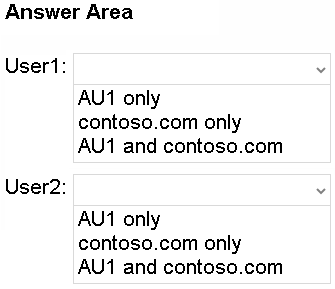
You have a Microsoft Entra tenant named contoso.com that contains an administrative unit named AU1 and two users named User1 and User2. User1 is a member of AU1.

You need to perform the following role assignments:

• User1: Security Administrator

• User2: User Administrator

For which scopes can each user be assigned the role? To answer, select the appropriate options in the answer area.

NOTE: Each correct selection is worth one point.

Question 69

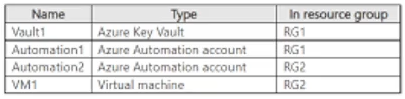
You have an Azure subscription named Sub1 that contains the resources shown in the following table.

Sub1 contains the managed identities shown in the following table.

Sub1 has the role-based access control (RBAC) role assignments shown in the following table.

For each of the following statements, select Yes if the statement is true. Otherwise, select No.

NOTE: Each correct selection is worth one point.

Question 70